Prompts Overview
The Prompts Overview dashboard provides a high-level command center for tracking, organizing, and managing the distribution of your prompt ecosystem within Kompass. It helps product managers and technical teams gauge operational capacity across workflow types, manage conceptual prompt clusters, and curate evaluation baselines using Golden Sets.
Navigation
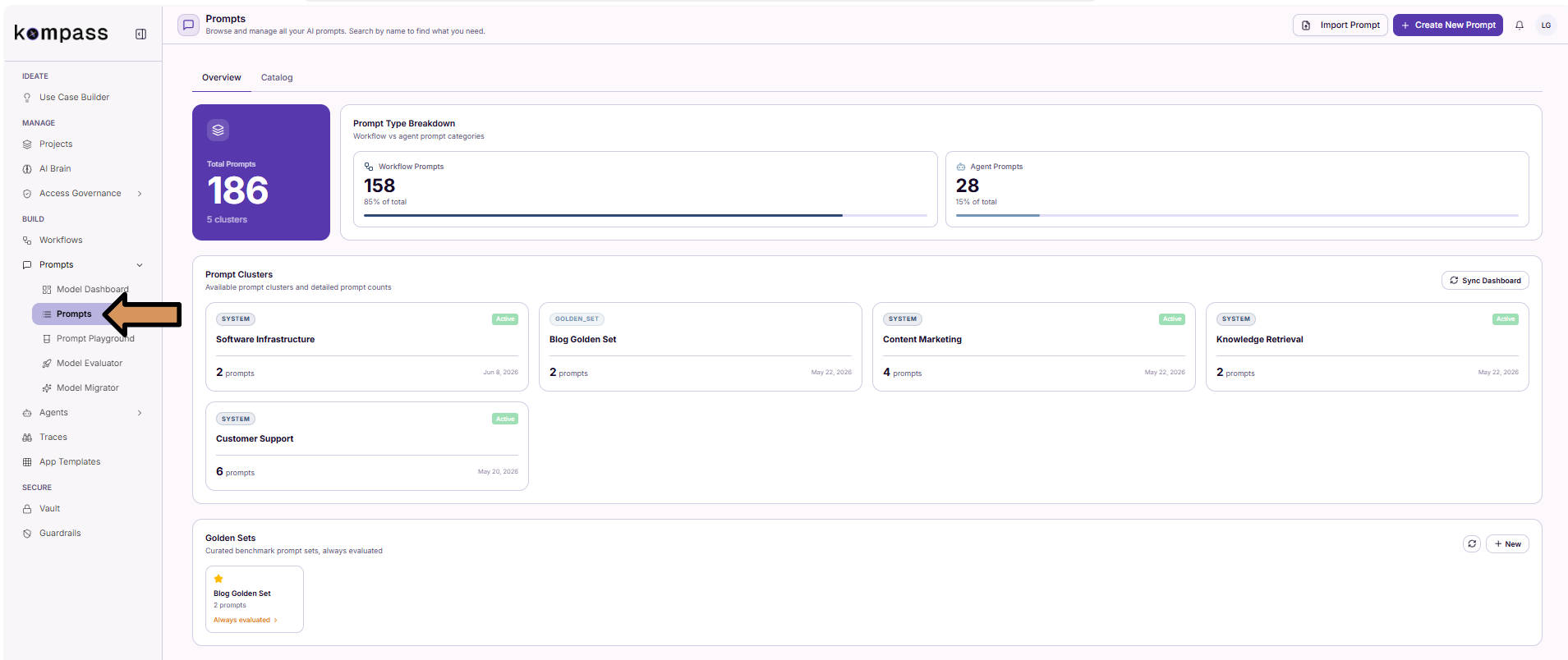
Operational Metrics Breakdown
The top of the dashboard provides real-time visibility into your total configuration volume across environments.
- Total Prompts: The absolute volume of unique prompt configurations saved in your library.
- Prompt Type Breakdown: A comparative progress meter showing your architectural distribution split between:
- Workflow Prompts: Single-step or sequential application logic tasks.
- Agent Prompts: Multi-message, complex reasoning, or conversational AI assistant nodes.
Automated Prompt Clustering
As your team develops prompts to serve different areas of your platform, manual organization can become bottlenecked. Kompass addresses this by utilizing automated Prompt Clusters.
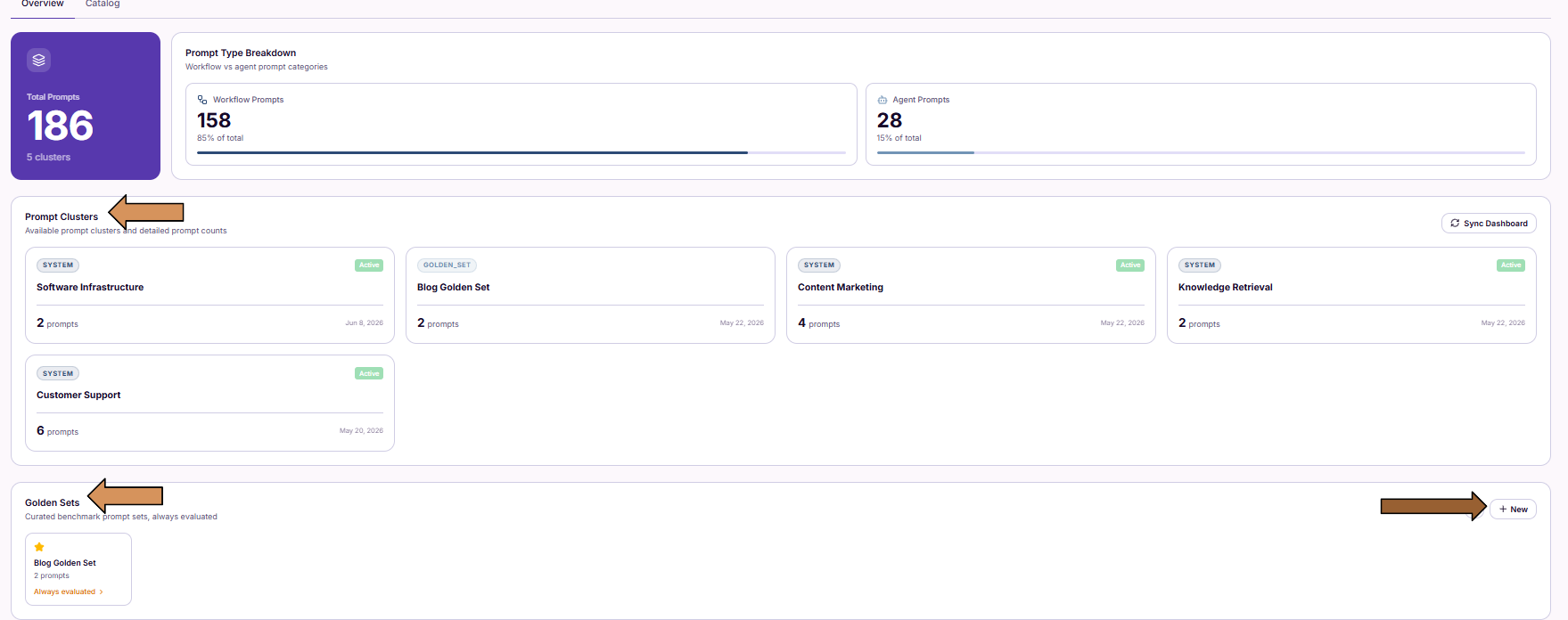
Dynamic Lifecycle
Organization happens behind the scenes. Whenever a user builds a new prompt inside the Prompt Builder, Kompass analyzes its metadata and semantic domain. The prompt is then processed automatically:
-
It is automatically categorized into a pre-existing cluster matching its functional scope (e.g.,
Customer Support). -
If it introduces a completely new operational context, a new cluster is dynamically provisioned to support it.
Why Clusters Matter: Cluster-Wide Evaluation
Clusters are not just for visual organization; they act as the structural framework for scaled quality control.
Instead of requiring engineers to run testing frameworks on individual prompts one by one manually, the Model Evaluator allows you to execute a single evaluation run across an entire prompt cluster. This lets you swap underlying models, benchmark quality scores, and measure performance shifts across your entire production prompt inventory simultaneously.
Managing Golden Sets
While clusters are dynamically managed by the system, Golden Sets are hand-curated evaluation benchmarks explicitly designed and managed by your engineering team.
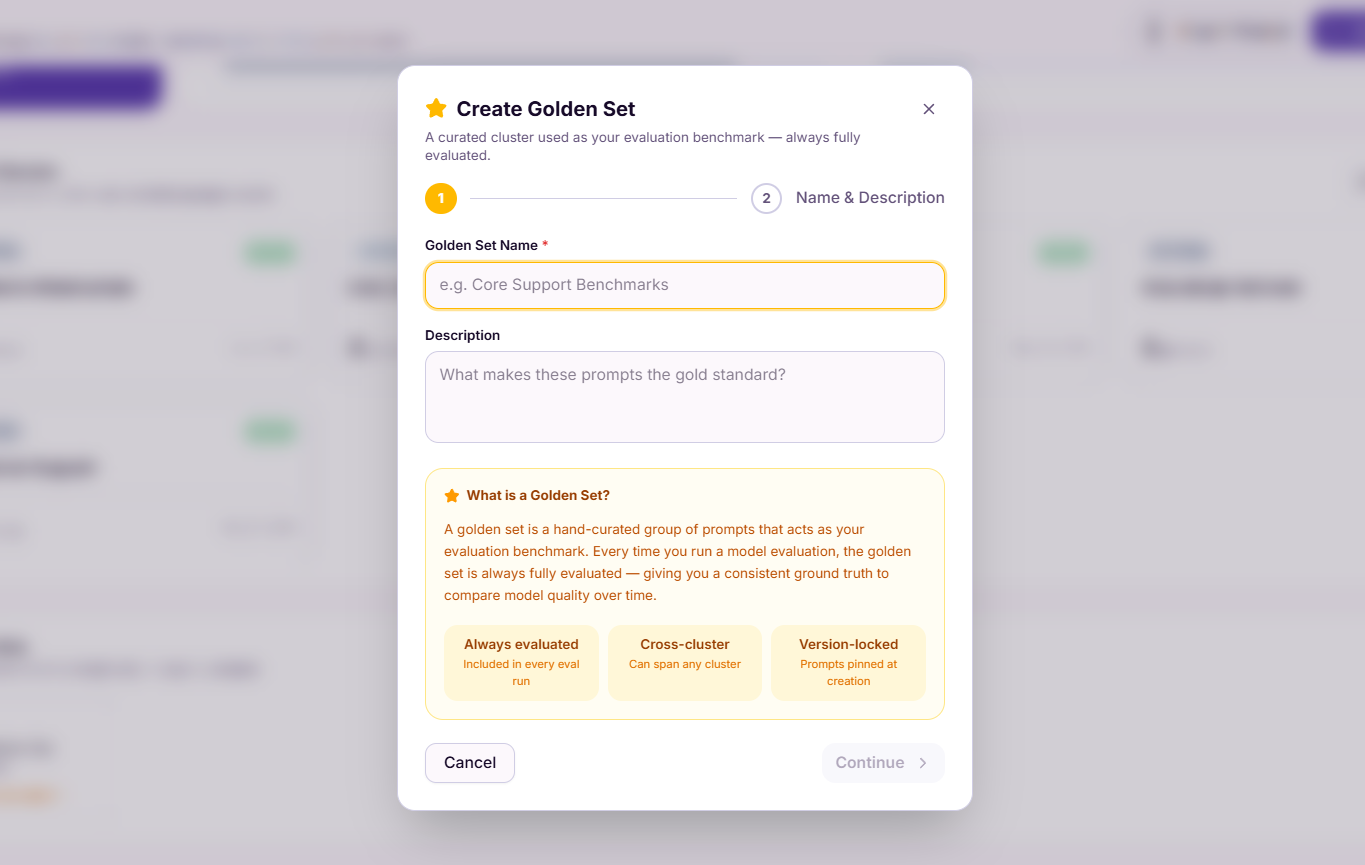
What is a Golden Set?
A Golden Set represents your team's "gold standard" prompt configurations. These are the most critical, highly optimized, and foundational prompts running in your retail or consumer application.
Evaluation Behavior
Unlike standard dynamic clusters, Golden Sets are always evaluated. Every single time a model evaluation suite runs across your infrastructure, the active prompts pinned inside your Golden Sets are tested automatically. This gives your team an unchanging, high-confidence ground truth to measure model quality, latency, and costs over time.
Characteristics of Golden Sets
- Always Evaluated: Included by default in every continuous integration/evaluation cycle.
- Cross-Cluster Capability: Golden sets can span across multiple functional boundaries, allowing you to group support, marketing, and backend tools into a single benchmark suite.
- Version-Locked: Prompts are explicitly pinned at their exact creation or approval state to prevent shifting variables from skewing your historic benchmark data.
How to Create a Golden Set
Follow these steps to establish a new golden benchmark suite within your workspace:
Step 1: Initiate Creation
Navigate to the Golden Sets section at the bottom of the overview tab and click the + New button.
Step 2: Define Identity and Context
In the configuration modal, provide a clear, distinct Golden Set Name and a thorough Description detailing what specific production baseline this set validates. Click Continue.
Step 3: Select Target Prompts
Browse or use the search bar to locate your benchmark assets. Check the box next to each prompt you want to pin to this evaluation suite.
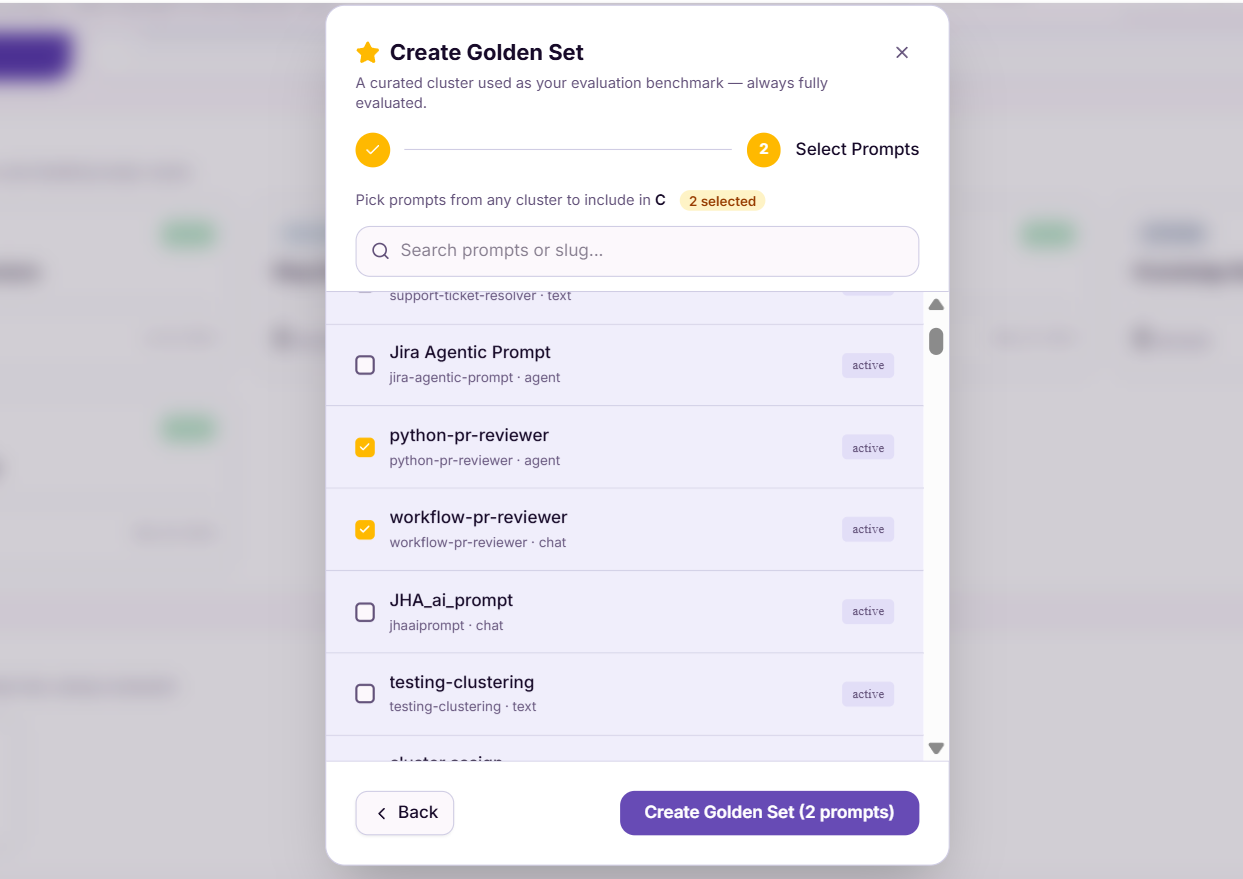
Step 4: Finalize and Save
Review the selection counter on the modal action line (e.g., 2 selected), then click Create Golden Set. The suite will instantly display on your dashboard labeled as Always evaluated.
How to Update a Golden Set
As your production targets change, you can easily modify your baseline evaluations by adding or removing prompts from your existing suites.
Step 1: Click on the golden set you want to update
From the Golden Sets section at the bottom of the overview dashboard, click on the specific Golden Set card you want to modify.
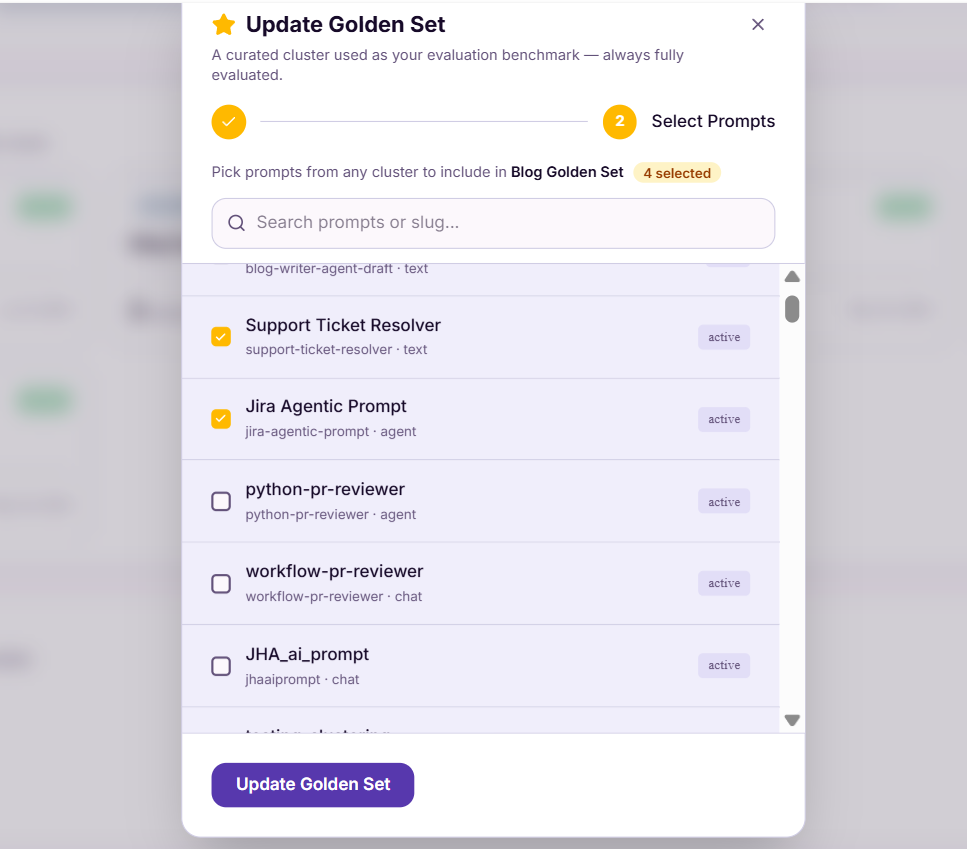
Step 2: Modify Selected Prompts
The prompt assignment canvas will open directly to your selected list.
- To add prompts: Search or browse the list and check the box next to any new configurations you want to lock into the benchmark suite.
- To remove prompts: Uncheck the box next to any existing prompt to exclude it from future runs.
Step 3: Save Changes
Review the update counter at the top of the list (e.g., 4 selected), then click Update Golden Set to instantly apply the changes to your continuous evaluation pipeline.
Summary
The Prompts Overview screen connects your day-to-day prompt creation with automated testing workflows through:
- Centralized management of prompt type volume across your clusters.
- Automated clustering tailored for high-efficiency, cluster-wide evaluations.
- Custom-curated Golden Sets to maintain a stable, always-evaluated reference standard across your deployment cycles.